






Bubble Guppies Classroom
 (1 оценок, среднее: 5.00 из 5)
 Loading...
Similar Games



Description
In Bubble Guppies Classroom you start with an empty room, a menu down the left side of the screen, and a teacher who needs help, which matters because nothing happens until you place the first piece. There is no timer and no score. The whole game is about deciding who joins today’s class and what they get to play with.
| Genre | Classroom decorating for young players |
| Controls | Mouse only |
| Teacher | Mr. Grouper |
| Pet | Bubble Puppy |
Two Clicks Place a Piece: Learning the Left-Hand Menu
The mouse is the only tool you need. Pick a piece from the menu on the left side of the screen, click it, then click anywhere in the classroom to drop it into place. That two-click rhythm is the whole interface, so even the youngest players understand it within a minute.
Pieces come in two families, characters and objects. Characters are the students and the pet from the show, while objects are the toys and classroom items Mr. Grouper likes to teach with. Keeping the two families in mind makes the menu feel much smaller.
Early in the game, most players fill the room too quickly and end up with a pile of overlapping pieces. Placing one character first and building the play area around them gives the scene a clear focus.
Choosing Your Guppies and Bubble Puppy in Bubble Guppies Classroom
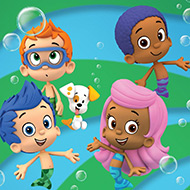
Mr. Grouper teaches at the Guppy School, and his students Molly, Gil, Goby, Deema, Oona, and Nonny can all be invited to class. Bubble Puppy is available too, so the full cast is eight characters counting the teacher. Nobody is required, which means the scene can be a quiet reading corner with only Nonny or a crowded playtime with everyone.
Hover the cursor over a character to hear what they have to say. Each voice is a small reward for clicking around, and it is the detail young players tend to repeat out loud for the rest of the session.
Fans of one particular Guppy usually build the whole room around them, so a Molly and Gil scene looks nothing like a Goby scene. Parents watching over a shoulder often end up suggesting who should sit next to whom.
Toys, Blocks, and Surprise Interactions
Ambulance is the piece that earns the most giggles. Slide the cursor over it to trigger a surprise, and treat it as one of the toys Mr. Grouper keeps close at hand.
Blocks and books are the quiet pieces. They make good foundations for a scene, since Mr. Grouper often uses toys to help his students learn about the world around them.
Plants soften a crowded room. Move the cursor across every object at least once, because the surprises are hidden in the hover.
Resizing, Removing, and Showing Off Your Bubble Guppies Classroom Scene
Every object is adjustable. Look for the buttons around a piece, then press the Plus sign to make it bigger or the Minus sign to make it smaller. Resizing is the trick that turns a flat row of toys into a scene with real depth.
To remove something, click it and send it back to the inventory on the left side. Mistakes are cheap, which is exactly why the game feels safe for very young players. When you are happy, press Next to see the finished classroom from afar, and you can even print it to show your friends.
The catch is the lack of goals. There is nothing to win and nothing to unlock, so players who need a challenge move on quickly, while those who love decorating stay for long stretches of play.
Bubble Guppies Classroom works best as a slow, cozy game. A Nonny corner full of books, Bubble Puppy beside the blocks, and Mr. Grouper waiting for you to press Next make a scene worth printing.