









Hover Racer Drive
 (Пока оценок нет)
 Loading...
Similar Games









Description
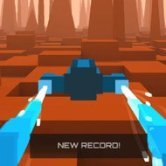
You tilt the craft a fraction to the left, a barrier flashes past the right wing, and the speedometer keeps climbing without asking your permission. Hover Racer Drive drops you onto a computer-simulated test course on Mars and leaves only one question open: how long can you keep dodging before the speed outruns your reflexes?
| Genre | 3D endless hover racing |
| Setting | Test course on Mars |
| Desktop controls | A and D or left and right arrows |
| Mobile controls | Tap the screen |
| Fail state | Hitting any obstacle |
Constant Acceleration in Hover Racer Drive
The craft never slows down. Every second on the course adds a little speed, and every bit of speed shortens the time you have to react to the next barrier. In the opening stretch obstacles feel generous and spaced out, but the gaps close noticeably as the run goes on.
That steady pressure is what makes the game addictive. There are no laps, no rivals and no finish line, just the distance counter and your own nerve.
Many players find their scores improve not by reacting faster but by reacting smaller. Tiny corrections keep the craft centred, while big swerves leave you badly positioned for whatever comes next.
Reading the Martian Test Course
The red landscape gives the course a distinctive look, but the real focus is the track itself. Obstacles appear in patterns, and recognising those patterns early is how experienced players survive at speeds that would end a beginner’s run instantly.
Looking further down the track rather than right in front of the craft is the single most useful habit. At high speed the obstacle directly ahead is already decided, and the one after it is where your next move should be planned.
Some players dislike how quickly the difficulty ramps up. Others love that a good run feels earned, because surviving the later sections genuinely takes focus.
Keyboard Versus Touch Steering
On desktop, A and D or the arrow keys give precise control, and quick taps are usually better than holding a key down. Holding sends the craft sliding further than intended, which is a common cause of crashes into side barriers.
On mobile, tapping the screen steers the craft, and the feel is slightly different. Touch players often prefer keeping their thumbs ready on both sides so neither direction is delayed.
Casual players will enjoy short sessions that fit into a few spare minutes, while competitive players tend to restart dozens of times chasing a better distance.
Hover Racer Drive Player Questions
Is there an end to the course?
No, the Martian test course is endless. The goal is to travel as far as possible, and the run ends as soon as the craft hits an obstacle.
Why does the game feel harder after a minute?
The craft keeps accelerating and obstacles appear more often as you progress. Both changes shrink your reaction window, which is why later sections demand smaller, earlier steering inputs.
Should you hold or tap the steering keys?
Tapping usually works better. Short taps keep the craft centred on the track, while holding a key often slides it too far and into a side barrier.
Hover Racer Drive is a pure test of reflexes on a red Martian course, where the endless acceleration turns every barrier into a sharper challenge and the best runs come from small, calm corrections with A and D.