











Turboprop Flight Simulator
 (1 оценок, среднее: 5.00 из 5)
 Loading...
Similar Games










Description
You throttle back to land the C-130 on an improvised runway, pull the thrust reversers, and learn within seconds how much Turboprop Flight Simulator asks of a heavy transport. The cargo ramp behind you is a reminder that this is a working aircraft, not a toy.
| Genre | Turboprop flight simulator |
| Aircraft | C-400, RL-72, C-130, and variants |
| Also drivable | Ground vehicles |
| Modes | Training missions, missions, open flight |
A Hangar of Turboprops: The Aircraft in Turboprop Flight Simulator
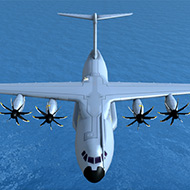
The hangar holds more than a dozen aircraft grouped into families. The C-400 tactical airlifter has coastguard rescue and special operations variants, the HC-400 and MC-400. The RL-42 and RL-72 are regional airliners, and the E-42 is a military early warning aircraft derived from the RL-42.
Then things get unusual. The XV-40 is a concept tilt-wing VTOL cargo aircraft with luxury and special operations variants, the PV-40 and MV-40, while the PS-26 is a concept private seaplane. The C-130 completes the set with its own HC-130 and MC-130 versions.
Pick a family before you pick an individual aircraft. Airliner fans gravitate to the RL-72, while cargo pilots go straight for the C-400 or the C-130.
Training Missions Come First, Then Real Jobs
Training missions teach the basics of flying, taxiing, takeoff, and landing, and skipping them is the most common beginner mistake. Turboprops behave differently from jets, so learning how throttle, rudder, and flaps work together saves a lot of ruined approaches later.
After training, missions of many kinds open up, and you can also build your own flight routes on the map. Early in the game, short hops between airports are the best way to learn how the aircraft slows down. Each mission is another chance to practice a landing under different conditions.
Casual pilots tend to stay with missions, while sandbox fans switch to open flight and wander wherever they like.
Cargo Ramps, Airdrops, and Ground Vehicles
You are not confined to the cockpit. In many levels and in open flight you can explore the aircraft interior in first person and interact with doors, the cargo ramp, strobes, and main lights. Walking the cabin of a transport before takeoff is a small ritual that gives the simulator a lot of character.
The cargo aircraft can load, unload, and airdrop supplies and vehicles. You can also drive ground vehicles yourself, which turns a delivery into a two-part job: fly the load in, then roll it out.
A typical cargo job has a clear order. Skipping a step usually costs you a landing.
- Load supplies or a vehicle through the cargo ramp.
- Plan a route on the map and take off.
- Land on the runway or airdrop the load.
- Unload, then drive the vehicle to its destination.
Rudder, Flaps, Spoilers, and Thrust Reversers: The Controls
The simulator gives you complete pilot controls: rudder, flaps, spoilers, thrust reversers, auto-brakes, and landing gear. Together they turn a landing into a checklist instead of a single button press.
Control schemes are flexible, including a mixed setup of tilt sensor and stick or yoke. Tilt splits opinions, because some pilots love the natural feel and others switch to the stick after their first gusty approach.
Two cockpit cameras, captain and copilot, let you sit in either seat. The engine sounds are close to recordings of real turbines and propellers, which makes headphones worth using.
Improvised Runways, JATO/L, Fog, and Wind in Turboprop Flight Simulator
Not every runway is an airport. You can take off and land on improvised strips, and JATO/L, short for Jet Assisted Take-Off and Landing, helps heavy aircraft on those short surfaces. Refueling works on the ground and in mid-air, which turns long routes into real planning problems. Whether you refuel early or push on is a decision the map will not make for you.
Conditions change the difficulty. Time of day, fog, and wind all affect how a landing feels, so a route that was easy at noon can be tense at dusk. Test one condition at a time so you learn what each does to the aircraft.
- Fog cuts visibility on the approach
- Wind pushes the aircraft off the centerline
- Time of day changes how far ahead you can read the runway
Tinkerers who love odd machines should try the XV-40 in bad weather at least once, since vertical takeoff changes what a short strip means.
What Pilots Ask Before Their First Flight in Turboprop Flight Simulator
Can you fly airliners as well as military transports?
Yes. The RL-42 and RL-72 are regional airliners, while the C-400 and C-130 are military transports. Coastguard and special operations variants add even more choice.
How do you learn the controls?
Start with the training missions. They cover flying, taxiing, takeoff, and landing, and they explain flaps and rudder before you meet a real mission.
Do you have to watch ads?
No. Ads are optional and rewarded, and they only appear between flights. Whether they bother you depends on how often you accept them.
Turboprop Flight Simulator rewards pilots who slow down. A careful approach in the RL-72, a properly timed thrust reverser on the C-130, or a cargo ramp lowered over an improvised runway makes every landing feel earned.