










Little Horrors: The Mortuary
 (Пока оценок нет)
 Loading...
Similar Games










Description
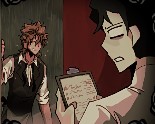
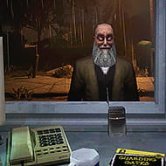
The phone rings in the middle of the night, and by the time you pick it up, your coworker already sounds like he shouldn’t be answering. That’s the opening beat of Little Horrors: The Mortuary — no long cutscene, no settings menu detour, just a call about someone stuck in the storeroom and a walk into a building that’s too quiet for a normal night shift. You take the call, get moving, and the game hands you control almost immediately.
| Genre | Point-and-click horror adventure |
| Platforms | Windows, Linux |
| Average session | A few minutes |
| Controls | Primary mouse button to move and interact, secondary button to examine objects and advance dialogue |
The Midnight Call That Opens Little Horrors: The Mortuary
Everything starts with the same premise: your coworker is trapped in the storeroom, and you’re the only one who can help. There’s no prologue explaining who you are or why you’re the one getting this call at midnight — the game trusts you to just go. That trust is part of what makes the opening land. You’re not handed a checklist or an objective marker; you’re handed a phone call and a door.
Early rooms are sparse on purpose. A front area, a hallway, the storeroom itself — each one gives you two or three things to click on, and the large, simplified pixel art keeps your eye on exactly what matters. It’s a deliberate contrast to horror games that clutter every room with red herrings. Here, if something is clickable, it’s probably relevant.
This restraint is also why the pacing works in such a short game. You’re never wandering, never backtracking through five rooms hunting for one missed object, which matters a lot when the whole experience runs only a few minutes long.
Reading the Storeroom Without a Map
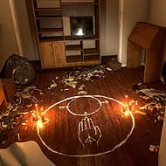
Once you reach the storeroom, the tone shifts. What looked like a fairly ordinary rescue mission starts feeding you small, specific details — a freezer that shouldn’t be making noise, a drawer that doesn’t sit flush — and the game leans on environmental cues instead of dialogue to tell you something’s wrong. Beginners tend to click through these details too fast, treating them as flavor text rather than as the actual story delivery method.
That’s the biggest early mistake players make: skipping the examine action. Because the primary click both moves your character and interacts with objects, it’s easy to walk past something you were meant to stop and look at with the secondary button. Slowing down in the storeroom specifically pays off, since that’s where most of the game’s environmental storytelling is concentrated.
There’s also a rhythm to how information gets revealed — you get a little, then a beat of silence, then a little more. It’s not a puzzle in the traditional adventure-game sense of combining items; it’s closer to reading a room correctly the first time.
Point-and-Click Controls and the WASD Complaint
Little Horrors: The Mortuary uses mouse-only movement, and that choice has been the single most debated part of the game in player comments. People coming from modern first-person horror expect WASD, and when the character instead walks to wherever you click, some find it clunky rather than nostalgic. Others recognize it immediately as a callback to classic point-and-click adventures and wouldn’t want it changed.
It’s a fair criticism either way. The mouse-driven movement is intentional, built around the same interaction logic as the genre it’s paying tribute to, but that intention doesn’t automatically make it comfortable for everyone. If you’ve never played an older point-and-click title, expect a short adjustment period before the movement stops feeling like an obstacle.
- Left-click to walk toward a spot or interact with something highlighted
- Right-click to examine an object more closely or push dialogue forward
- Escape opens the pause menu if you need a breather mid-scene
What the Corpse Does After the Freezer Scene
Without spoiling the specific sequence, the freezer is where the game commits to being a horror game rather than just an atmospheric walk. Something that should stay still does not stay still, and the shift in tone happens fast enough that it catches most first-time players off guard. It’s the moment people bring up most often when describing the game to friends.
By the time you reach that scene, the earlier slow pacing makes more sense in hindsight — the quiet setup was building toward this one specific jolt rather than toward a series of smaller scares spread evenly through the runtime. That’s a different structure than most horror games use, and it’s part of why the experience feels tight instead of padded.
How long is Little Horrors: The Mortuary?
Most players finish it in roughly the time it takes to make a cup of coffee — the average listed session is a few minutes, and there’s no filler content stretching that out. It’s built as a short, complete story rather than a demo-length teaser.
Does the story continue after the ending?
The current release ends the storeroom incident on its own, but the developers have confirmed plans for two more entries plus a final chapter, so the midnight call you answer here is meant to be the first of a planned series rather than a one-off.
Is there more than one ending?
As released, the game follows a single fixed path from the phone call to the freezer to its conclusion — there isn’t a branching choice system, which fits its identity as a short, focused scare rather than a replayable adventure.
Little Horrors: The Mortuary and Its Planned Sequels
What sticks with most people after finishing isn’t a jump scare — it’s the storeroom itself, and the sound the freezer makes right before things go wrong. Little Horrors: The Mortuary earns its short runtime by refusing to waste any of it, walking you from a midnight phone call to that freezer without a single room that doesn’t matter. If the mouse-driven movement throws you off at first, stick with it; by the time the drawer starts rattling, you won’t be thinking about the controls at all.