











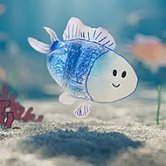
Drawquarium
 (1 оценок, среднее: 5.00 из 5)
 Loading...
Similar Games







Description
What happens when an aquarium game hands you a drawing pad instead of a catalog of fish? In Drawquarium, your own scribbles become the residents, and the tank slowly turns into a small habitat shaped by how you draw. It is a quiet single-player sandbox, so the pace is whatever you decide it should be.
| Genre | Cozy sandbox |
| Players | One |
| Main activity | Sketching creatures and scenery |
| Unlock currency | Golden scales |
| Side tools | Journal, task list, timer, clock |
Sketching Residents for Your Drawquarium Tank
The drawing pad lets you shape a creature from whatever lines come to mind. Templates act as a nudge when you are staring at a blank canvas, and a set of pre-made fish is there if you would rather skip sketching altogether. The brushes are basic on purpose, so lines come out a little rough, and that roughness is a big reason the finished animals look hand-made rather than polished. If you want crisp artwork, you can draw in another program and bring in a PNG.
Newcomers tend to stall by aiming for a showpiece on the first try. A better habit is to sketch something quick, release it into the water, watch how it moves, and adjust on the next attempt. Early in the game the tank is small and nothing is at stake, so a few lopsided experiments cost you nothing and teach you what reads well at swimming size.
Seaweed and props get the same treatment, which means even the scenery is yours. Because anything you draw can be placed, some players fill the water with things no real aquarium would hold. Parents can also drop in a child’s PNG drawing and watch it float among the rest, a small moment that explains why many players keep the tank open.
How Fish Behave Once They Share the Water
Your residents do not just drift around. Some bond with a neighbor, others bicker with whoever swims too close, and certain pairs go on to produce young. Once a couple forms, the tank starts to feel like a tiny community with its own gossip, and adding a single new fish can shift the whole mood.
Looking after them is the loop that moves things forward. You feed and raise your fish, gather golden scales, and exchange them for fresh decorations and extra tools. The unlock path is gentle rather than a grind, so after the first few scales you can already reshape the sand, the lighting, and the layout with rocks and driftwood.
The honest catch is that nothing tells you what to do next. Collectors who enjoy opening up new items will find plenty to chase, but players who need clear goals may drift away. Steam reviews sit near 98% positive across 259 reviews at the time of writing, and the developer suggests trying the demo first, especially on older machines.
Desktop Wallpaper Mode and Focus Tools in Drawquarium
Desktop Wallpaper Mode moves the tank out of its own window and puts it behind everything on your screen. Your fish keep swimming while you type, watch videos, or scroll through a forum, and you can still check on them without reopening the main game. It turns a small creative project into a permanent piece of your workspace.
The built-in journal, task list, and timer add a practical side. Students and remote workers can jot down thoughts, plan the day, and run focus sessions with the tank drifting nearby, which feels calmer than a plain timer app. None of these tools are essential, but they give the sandbox a reason to stay open for hours.
The clock can be restyled so it blends into your scene instead of sitting on top of it. Combined with the wallpaper, it makes the tank feel like part of the desktop rather than a program you launch and close. It is worth testing the demo to see how the setup behaves on your own machine before buying.
Drawquarium Questions Before You Start
- Can Drawquarium work as a moving desktop background? Yes, Desktop Wallpaper Mode puts your tank behind your windows so the fish stay on screen while you work. You can still feed them and interact with them from the desktop.
- Do you need to draw well to enjoy Drawquarium? No. Templates give you a starting shape, the pre-made fish are ready to use, and you can import a PNG made elsewhere if you want cleaner art. Rough sketches look charming once they start swimming.
- What are golden scales used for in Drawquarium? They are the currency you earn by caring for your fish, and you spend them on new decorations and tools. They open up the sand, lighting, and décor options that make each tank look different.
Drawquarium works best when you stop trying to finish it and just let the tank run. Sketch a few odd fish, wait for two of them to pair up, spend your golden scales on a new piece of driftwood, and switch on Desktop Wallpaper Mode so the journal and timer sit beside a tank that keeps changing on its own.